
PostgreSQL support added to GlobalSearch 6.3.359
In order to utilize a PostgreSQL connection string you have to prefix the connection string with [postgresql] like below;
[postgres]Host=<>;Port=5432;Database=<db>;Username=<username>;Password=<password>;
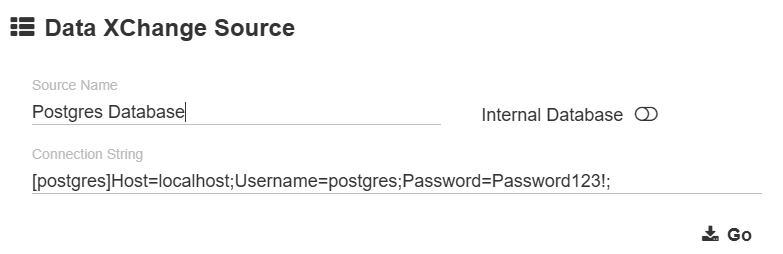
Connection string supported settings;
Cloud Customers
This is useful to pull data from your GlobalData configuration. For the Cloud specific configuration you need to add additional options to enforce SSL connection required.
SslMode=Require;Trust Server Certificate=true;
Settings
On Add
The On Add option will only run when a document is imported. Any DXCs marked with On Update will not run when a document is being imported.
On Update
This API call is NOT used by GlobalAction so GlobalAction updates do not result in the On Update DXCs firing.
Runs as a part of the PUT calls made to the /square9api/api/UpdateDocument/ endpoints.
Exact Match
This option, when set to true, will cause a Data XChange to return no matches if multiple matches for a query are found.

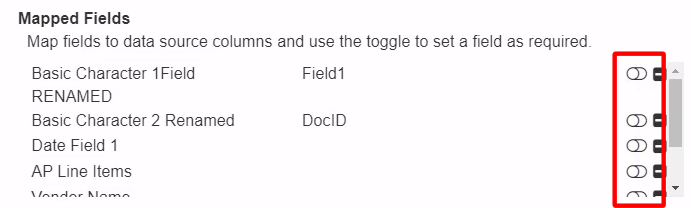
Required Field
This option will cause a Data XChange to return no matches if a value is not provided for it.
Related SQL Tables
-
SmartSearch.dbo.ssDataXCMapping
|
Column Name |
Data Type |
Use |
|---|---|---|
|
IID |
int |
|
|
SourceID |
int |
IID of DataXchange in ssDataXCSource |
|
FieldID |
int |
FieldID of field in archive that will be populated/used in lookup |
|
SourceField |
varchar(150) |
|
|
Required |
bit |
|
-
SmartSearch.dbo.ssDataXCSource
Connection Strings
Internal Database
Provider=SQLOLEDB;Integrated Security=SSPI;Persist Security Info=False;Initial Catalog=SmartSearch;Data Source=(local)\SQLEXPRESS
Other Sources
Provider=MSOLEDBSQL;Integrated Security=SSPI;Persist Security Info=False;Initial Catalog=SmartSearch;Data Source=(local)\SQLEXPRESS