
GlobalCapture has been updated to support a number of enhanced settings for barcode extraction.
High Performance
High quality barcodes are recognized well in this mode, prefers speed over accuracy.
Normal Quality
Suitable for most barcodes. This is the general starting point for most extraction processes to balance performance.
Max Quality
This preset is developed to recognize all possible barcodes, even incorrect barcodes.
High Quality
This preset is developed for low quality barcodes. Allows to detect diagonal and highly damaged barcodes.
Advanced
Customize your barcode extraction.
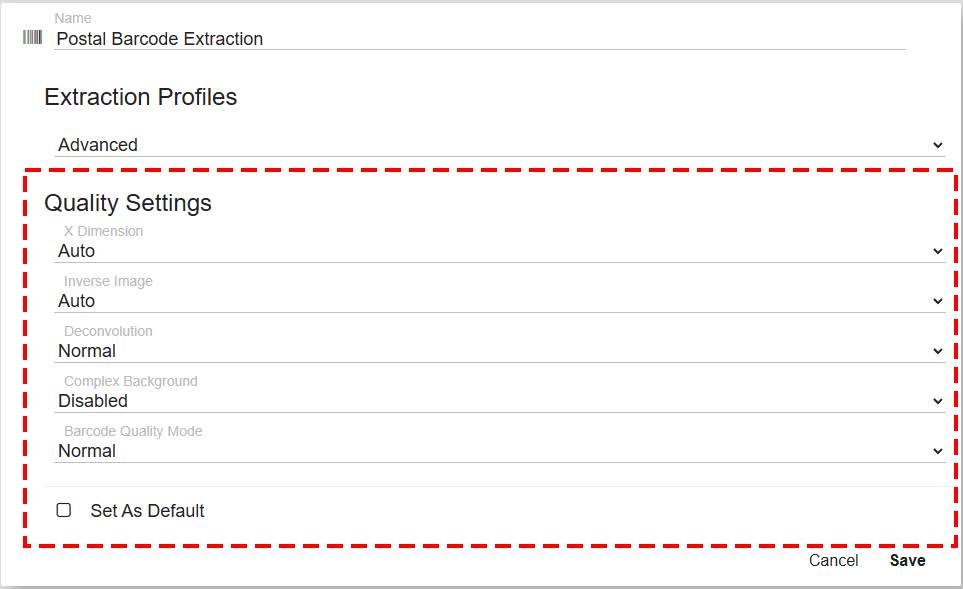
-
X Dimension is the recognition mode which sets the size of the barcode element.
-
Inverse enables or disables additional recognition of barcodes on images with inverted colors. (White characters on dark background.)
-
Deconvolution uses image-sharpening to reverse blur in scanned documents.
-
Complex Background enables or disables additional recognition of color barcodes on color images.
-
Barcode Quality adjusts how intensively the recognition engine scans and decodes barcodes. This mode trades processing speed for recognition accuracy.
Enable Set As Default, if you would like this to be the default Barcode profile.