
The Batch Manager interface is where you monitor the progress and history of documents in your Workflows. You can view the full history of documents through the Workflow process, including which Workflow, Nodes, and Process Fields have affected the document.
Within Batch Manager, you can easily track workflow progression, choose which fields to display, and filter your workflow documents by any of the displayed fields to target the documents you need. From the Batch Manager you can quickly locate and access documents which may need to be viewed, validated, or edited in either the GlobalCapture Validation Station or the GlobalSearch Document Viewer.
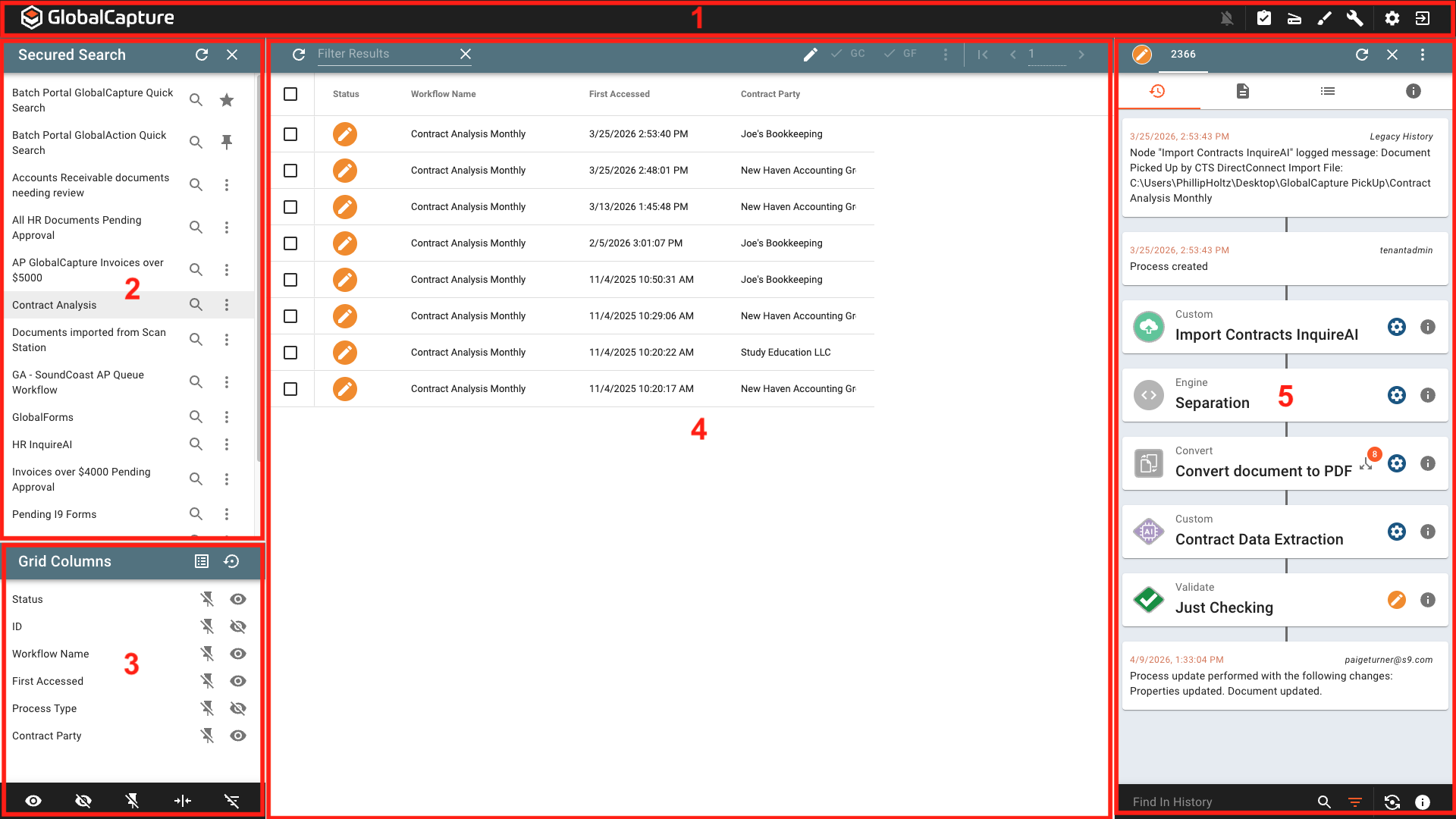
The main areas of batch manager are:
-
GlobalCapture Toolbar - Quickly navigate to other areas of GlobalCapture, access user setting to customize your experience, or logout.
-
Search Pane - Run searches to quickly view processes. Only searches to which you are secured or are marked as Validation Security Enabled are visible.
-
Grid Columns - Change the process fields displayed in the Search Results Grid.
-
Search Results - Displays any processes matching your search with configured index field data.
-
Process Drawer - Displays history, process data, workflow information, and, optionally, thumbnails.