

Content Extract extracts clean, readable text from common business document formats and makes that content available to InquireAI for interpretation.
For example, Content Extract can extract the text from a purchase order or invoice, allowing InquireAI to identify information such as line items, quantities, prices, and totals.

Content Extract is an extraction tool, not an interpretation tool. It extracts document content faithfully and preserves table structure by maintaining column alignment wherever possible. Interpretation, classification, and understanding of the extracted content are handled by InquireAI.
Content Extract does not modify, validate, normalize, or "correct" the extracted data.
Usage
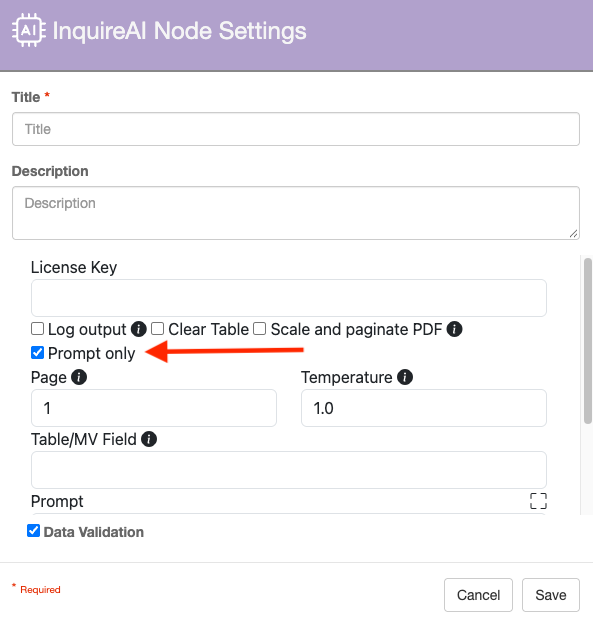
Content generated from this node is only available internally to the GlobalCapture platform. The InquireAI node will attempt to pick up extract content when the “Prompt Only” option is checked on the InquireAI node.
The node must be placed in the workflow before the InquireAI node is encountered.
Supported File Types
|
Format |
Extension |
What you get |
|
|
.eml |
The message body as readable text (plain-text body, or HTML body converted to clean text). |
|
|
|
Page text with tables reconstructed so columns stay aligned; typed-in form-field values included. |
|
Excel |
.xlsx |
The active worksheet as an aligned table. |
|
Word |
.docx |
Paragraph text plus any tables, with columns aligned. |
|
CSV |
.csv |
Rows as an aligned table; comma, semicolon, or tab detected automatically. |
|
XML / JSON / Text |
.xml, .json, .txt |
The content exactly as-is. |
Tabular Data
Tabular data is output with columns separated by tabs and blank cells preserved, so a value always stays under the correct heading — this is what lets InquireAI reliably read fields like QTY even when a column is empty on some rows.
Important Notes
-
General — Extracts text only. No interpretation, validation, or semantic analysis is performed.
-
PDF — Text-based PDFs are supported. Scanned or image-only PDFs are not read and must be processed with OCR first (Convert Node); the tool flags these documents when detected. Tables are reconstructed based on text positioning and are generally reliable for standard layouts, but complex or unusual layouts may result in occasional column or row misalignment. Values in fillable PDF form fields are also captured.
-
Email — Only the message body is extracted. Attachments are not processed as part of the email extraction. To extract content from an attachment, process the attachment separately (Import Node).
-
Excel — Only the active worksheet is read; other worksheets are ignored. Cell values are captured as displayed. For cells containing formulas, the calculated result is captured rather than the formula itself.
-
Word — Only the main document body is extracted. Content in headers, footers, text boxes, and shapes is not included.
-
CSV — The delimiter is automatically detected. Quoted fields, including fields containing commas or line breaks, are handled correctly.
-
XML / JSON / Text — Content is passed through exactly as provided, without reformatting or transformation. This behavior is intentional and avoids unnecessary processing and associated costs that provide no benefit to InquireAI.