
Every time a form is submitted, GlobalForms saves a submission. Administrators can view, search and export a form's submissions from the form builder.
Open the submission list
-
Open the form in the form builder.
-
Select the View Data tab.
The list shows the form's submissions, 25 per page by default.
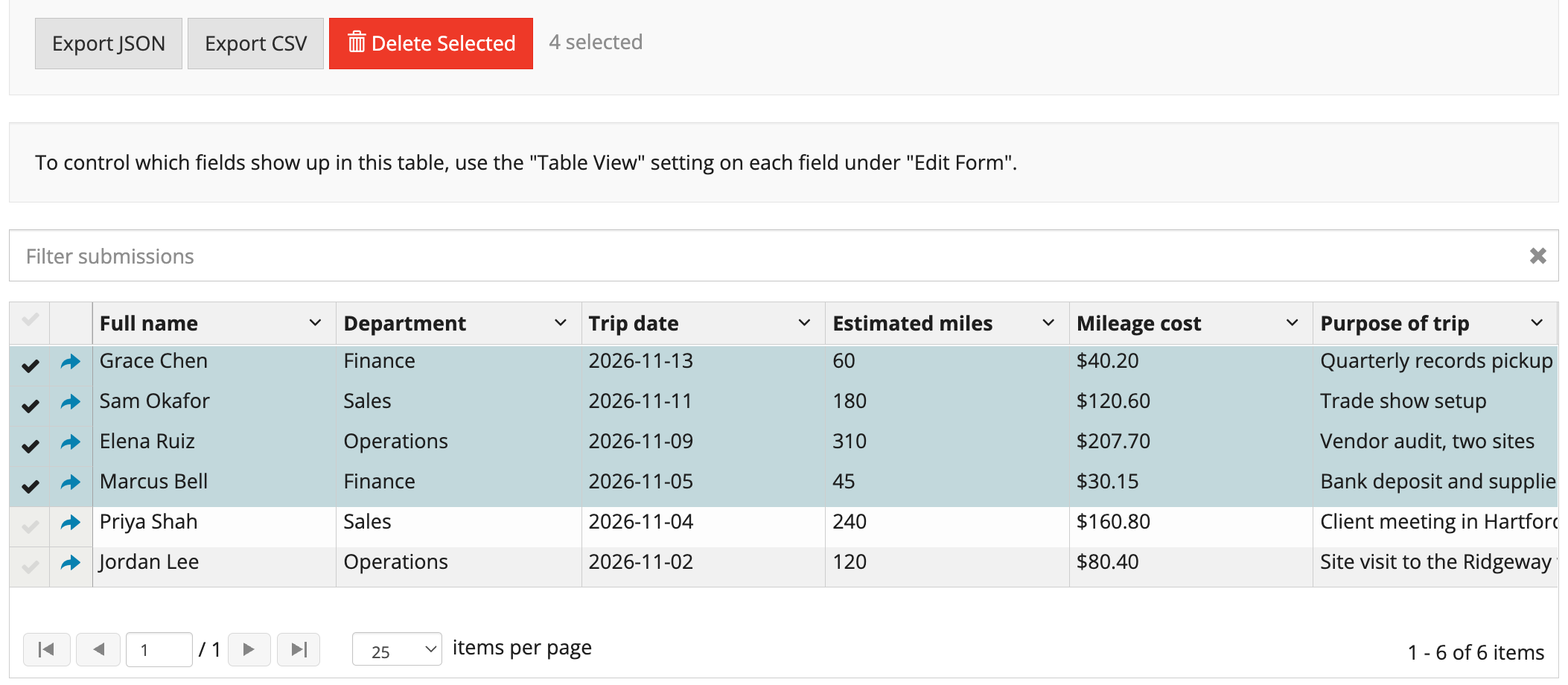
Search submissions
Type in the Filter submissions box. GlobalForms searches the submission IDs and every submitted value, across all of the form's submissions, not just the current page. Results update shortly after you stop typing. Clear the box to show all submissions again.
Move through pages
-
Use the page controls below the list to move between pages. The total number of submissions is shown.
-
Choose how many submissions to show per page (10, 25, 50 or 100) with the page size selector.
Open a submission
Select a row to open the submission. From there you can view it and, with permission, edit it. If the form uses the GlobalCapture Workflow action, the GlobalCapture panel shows the submission's workflow status.
Data Grid and Edit Grid fields
Fields inside a Data Grid or Edit Grid are shown together in one column, as a small table of all the rows. Their individual fields don't get separate columns.
-
Hover over the cell and use the mouse wheel to scroll its contents.
-
Drag the handle at the bottom edge of the cell to make all rows taller or shorter.
Select several submissions
Select the checkboxes on the rows you want. Hold Shift and click to select a range of rows. Select all selects the submissions on the current page. Use a selection to delete several submissions at once; see Deleting Submissions.
Export submissions
Select Export CSV to download the submissions as a spreadsheet file, or Export JSON to download them as JSON. The export always contains all of the form's submissions, whatever is filtered, selected or on the current page.
Search, paging and multi-select require GlobalForms version 10.8 or greater.