
Entra administrator, use the following sequence to setup permissions in Entra for access to Exchange via Graph API. This is the modern approach to integration with Exchange in Microsoft’s cloud.
-
You should only use this method for o365 mailboxes. Previous access methods are deprecated from Microsoft and should be replaced with this alternative.
-
Mailboxes MUST be licensed user mailboxes when used with Square 9 products. Do not use a “shared” or “group” mailbox. Square 9 can provision a mailbox on your behalf in the Square 9 cloud (only for cloud customers). With this approach, send emails directly to the Square 9 mailbox, or mail can be received by the customer’s mail gateway and then filtered / forwarded to the mailbox.
Microsoft will from time to time update interfaces and documentation. It’s always advised to refer to current docs for proper configuration.
https://learn.microsoft.com/en-us/entra/identity-platform/quickstart-register-app
-
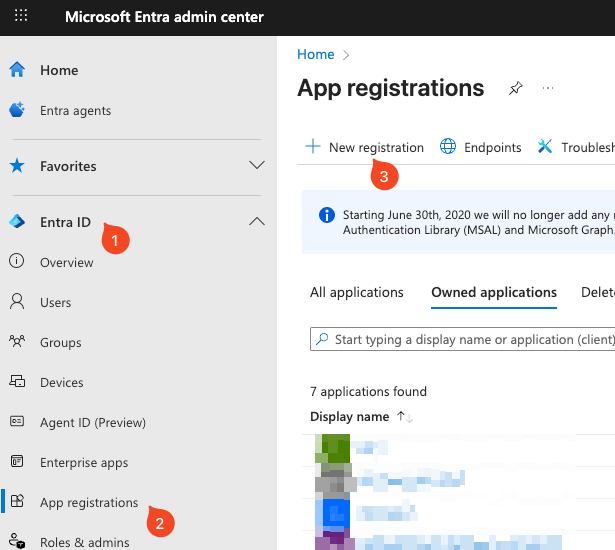
App registration: Create an app in Microsoft Entra admin center (Azure AD).
-
Assign permissions: Add Graph API permissions (
Mail.ReadandMail.ReadWrite).
-
Admin consent: An administrator must grant consent for those permissions.
-
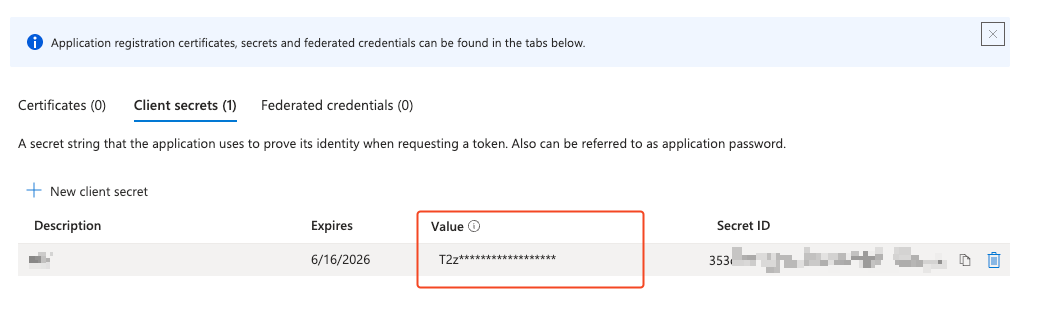
You will need to generate a client secret. Note that secrets do have an expiration. You will need to make sure you refresh the secrect prior to it’s expiration for continued fuction.
-
In GlobalCapture you will need the Tenant ID, the Client (Application) ID, and the Client Secret (Value from step 5).
-
Test your Graph API credentials with the PowerShell script documented here.
NOTE: Square 9 cannot assist with granular permissions assignments for how to implement them. Contact your Entra support team if you need help specifically with point 2 above. This permissions are very broad, which is likely fine in most environments. Customer’s with security concerns will wish to restrict the applications access, which is configured in Entra/Exchange and beyond Square 9’s scope.
NOTE:This is for importing from O365 specifically. Not from an on-premise mailbox.
NOTE: You cannot import from a shared mailbox.