It should be noted:
Square 9 Cloud customers are not impacted by this vulnerability.
In the Square 9 ecosystem, no external / public access to MongoDB is required, and MongoDB should never be configured in a way that might allow external client access. If your MongoDB configuration allows for such access, you should separately and immediately remedy this as an unrelated issue.
MongoDB can and should be configured to require authentication. If you need assistance configuring credentialed access to MongoDB with Square 9 applications, refer to the KB article here.
This issue affects MongoDB versions:
-
MongoDB 8.2.0 through 8.2.2
-
MongoDB 8.0.0 through 8.0.16
-
MongoDB 7.0.0 through 7.0.26
-
MongoDB 6.0.0 through 6.0.26
-
MongoDB 5.0.0 through 5.0.31
-
MongoDB 4.4.0 through 4.4.29
-
All MongoDB Server v4.2 versions
-
All MongoDB Server v4.0 versions
-
All MongoDB Server v3.6 versions
This notably does not include MongoDB 2.2.4 and MongoDB 3.4.6, two very common versions of MongoDB utilized by GlobalSearch/GlobalCapture. If an environment is on 2.2.4 or 3.4.6 they are not impacted by this issue and no steps are needed to mitigate the vulnerability.
The Determine Software Version knowledge base page has a MongoDB section that can be used to find the MongoDB version.
The issue is related to the zlib network compressor introduced in MongoDB 3.6, this is enabled by default, if an environment is on an impacted version you will need to update the configuration file to explicitly disable zlib compression by omitting it from the list of enabled network compressors.
Check if zlib network compressor enabled
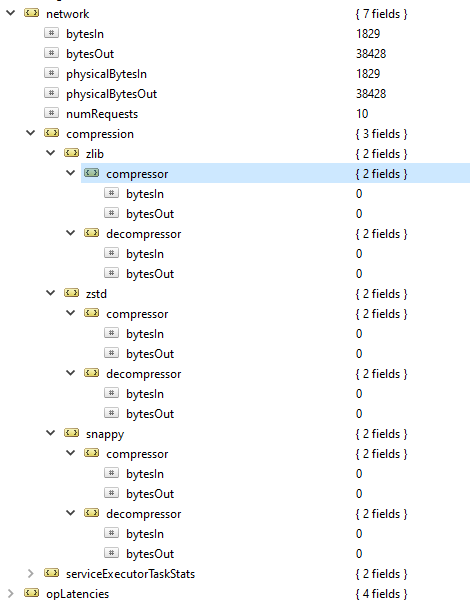
First, check if the zlib network compressor is in use in the environment by running db.serverStatus(), in the output there should be a network.compression section, each subitem here is a separate compressor that can be used by a connection, check/verify if zlib is in use. The screenshot below indicates that none of the network compressors have been used since MongoDB server start, so it should not have any impact to disable it.
Disable zlib network compressor via config file
Add the following section to the mongod.cfg file (default location of C:\GetSmart\mongod.cfg), note that if any network settings are already present you’ll need to incorporate the other settings and format it appropriately
net:
    compression:
        compressors: zstd,snappy
Restart MongoDB server
Any changes made to the MongoDB config file will require the server to be restarted to apply. Restart and run db.serverStatus() and the zlib section should no longer appear under network.compression
See Also:
https://jira.mongodb.org/browse/SERVER-115508