
S9 Notation is a tool for embedding variables into Annotations, Workflow Nodes fields, and email notifications. These notations are replaced at run-time by Field values. To see a list of notations available for a Field, type in a single brace ( { ).
Standard S9 Notations
Every GlobalAction & GlobalCapture Workflow comes with a set of standard S9 Notations that can be used. The available system fields will vary based on workflow type and field type.
|
Formatting |
Result |
Field Type(s) |
Product |
|---|---|---|---|
|
{ACTIVETEMPLATE} |
The Active Template is used with the Classify Node. If a document has been matched to a template, the Active Template is then set to the name of the Zonal OCR Template that was applied. |
Character |
GlobalCapture |
|
{BATCHID} |
The Batch ID is a unique ID given to each “batch” of document(s) that are processed. If a batch has only 1 document, then it will have it’s own Batch ID. If 3 documents were imported as one batch, then all three batches in the batch Manager would have the same Batch ID. |
Character |
GlobalCapture, GlobalAction |
|
{CLASSIFIEDTEMPLATES} |
If a batch has been classified successfully with a template during the workflow process, the corresponding template’s unique Template ID will appear here. |
Character |
GlobalCapture, GlobalAction |
|
{CURRENTNODEID} |
The ID of the node the document is currently in. The ID of the node will be unique to each node in the workflow. |
Character |
GlobalCapture, GlobalAction |
|
{CURRENTNODENAME} |
The name of the node in which the document is currently residing. |
Character |
GlobalCapture, GlobalAction |
|
{DOCUMENTLINK} |
Contains a local document link path. When providing a document link, authentication will be required. |
Not Field Type dependent, Node dependent. |
GlobalCapture, GlobalAction |
|
{ENGINEID} |
The ID of the engine currently working on the process. |
Character |
GlobalCapture, GlobalAction |
|
{FILEPATH} |
The current location of the file being processed. This is only available if that file has never been separated by the engine. |
Character |
GlobalCapture |
|
{FIRSTACCESSED} |
The date and time when the GlobalCapture Engine first accessed the batch in question. This is indicated by a date/time stamp in the server’s local timezone. |
Date |
GlobalCapture |
|
{FORMID} |
The FormID of the GlobalForms form that the submissions are being imported from. |
Character |
GlobalCapture |
|
{INITIALFILESIZE} |
The current file size of the document in bytes. |
Numeric |
GlobalCapture |
|
{INITIALPAGECOUNT} |
The initial page count of the document being processed at time of ingestion. |
Numeric |
GlobalCapture |
|
{LASTACTIONUSER} |
The user account of the user who last accessed the document. Generally speaking, this will be the service account user running the GlobalCapture service, or if Validation or Queue actions have been taken, the user who took those actions. |
Character |
GlobalCapture, GlobalAction |
|
{LASTACCESSED} |
The date and time when the file was last accessed by either a user, or the workflow engine. |
Date |
GlobalCapture |
|
{LASTUSERMODIFIED} |
Contains the last user to either scan or validate the process. |
Character |
GlobalCapture, GlobalAction |
|
{MAXIMUMPAGECOUNT} |
Pages can be added or removed by users with the proper permissions during a workflow process, this records the maximum number of pages that have been in the document. |
Numeric |
GlobalCapture |
|
{NODEENCOUNTERED} |
The list of nodes the document has been processed through up to and including the node where the process field is set to this value. |
Character |
GlobalCapture, GlobalAction |
|
{NOW} |
Contains the date and time that the notation is accessed. |
Character, Numeric, Decimal, Date |
GlobalCapture, GlobalAction |
|
{ORIGINALFILENAME} |
Contains the original name of the file prior to it being imported into the GlobalCapture Workflow. |
Character |
GlobalCapture |
|
{PAGECOUNT} |
The current page count of the document. |
Numeric |
GlobalCapture |
|
{PROCESSID} |
Contains the numeric unique identifier for this particular process. |
Character, Numeric, Date |
GlobalCapture, GlobalAction |
|
{PROCESSTYPE} |
Identifies the process as a GlobalCapture or GlobalAction process. |
Character |
GlobalCapture, GlobalAction |
|
{PROCESSPROPERTIES} |
Returns the Key:Value pair for all Process Properties in the Process Fields Drawer that have a value. All properties are retunred to single field. Returns a list of comma separted Values for Multi-Value fields. Does not return Table Data. Only returns GlobalCapture Process Fields. |
Character |
GlobalCapture, GlobalAction |
|
{QUEUE} |
The name of the Queue node where the document currently resides. As the document moves through the process this will update the the current Queue node or be empty if not currently in a Queue node. |
Character |
GlobalCapture, GlobalAction |
|
{RANDOM} |
Returns random int. Default max value is |
Character, Numeric, Decimal |
GlobalCapture, GlobalAction |
|
{RANDOM[MIN][MAX]} |
Returns random int in range indicated in the brackets. MIN is inclusive, MAX is exclusive. |
Character, Nemeric, Decimal |
GlobalCapture, GlobalAction |
|
{RELEASEDFILEPATH} |
Contains the path to the released document following a Release Node. |
Character |
GlobalCapture |
|
{SCANUSER} |
The username of the logged in user who performed the scan function. This value only appears if the document in question was scanned in using the Scan Station directly into the workflow. |
Character |
GlobalCapture |
|
{SSARCHIVEID} |
The GlobalSearch ArchiveID that identifies what Archives within the database the document resides. |
Numeric |
GlobalCapture |
|
{SSDBID} |
The GlobalSearch DatabaseID that identifies what database the document resides in. |
Numeric |
GlobalCapture |
|
{SSDOCUMENTID} |
The GlobalSearch DocumentID that identifies the specific document within the database. |
Numeric |
GlobalCapture |
|
{STATUS} |
This is the current status of the selected process. |
Character |
GlobalCapture, GlobalAction |
|
{SUBMISSIONID} |
The SubmissionID of the submission being processed from this specific form in GlobalForms. GlobalForms submissions can also be viewed directly within GlobalForms as well. Example link using the notation for linking to the document, with the link being sent from an email node. Then the process is in validation for GlobalForms resubmission. https://globalformstest.mysquare9.com:5454/view/#!/form/{p_FormID}/submission/{p_SubmissionID}/edit |
Character |
GlobalCapture |
|
{SUBMISSIONMODIFIED} |
The date and time the GlobalForms submission was last modified after the original submission. |
Character, Date |
GlobalCapture |
|
{TODAY} |
Contains the date that the notation is accessed. |
Character, Numeric, Decimal, Date |
GlobalCapture, GlobalAction |
|
{TOTALTIME} |
This value is the total time elapsed for the entire workflow process, from the Import to the End node. This includes time waiting for user interaction in Queues and Validation. |
Numeric, Decimal |
GlobalCapture |
|
{VALIDATIONUSER} |
The user that last performed an action against the process. (Bursting, saving, setting to ready, stopping, etc.) |
Character |
GlobalCapture, GlobalAction |
|
{WAIT} |
The amount of time a process has spent in it's current wait node. |
Numeric |
GlobalCapture |
|
{WAITSTART} |
The time at which the process has entered it's current Wait node. This is only available in GlobalAction. |
Date |
GlobalCapture |
|
{WORKFLOWENCOUNTERED} |
The list of Workflows the document has been processed through up to and including the current workflow. |
Character |
GlobalCapture, GlobalAction |
|
{WORKFLOWID} |
This value is the ID of the workflow the batch is currently processing in. |
Character |
GlobalCapture, GlobalAction |
|
{WORKFLOWNAME} |
This value is the name of the workflow that the batch is currently processing in. |
Character |
GlobalCapture, GlobalAction |
|
{WORKTIME} |
The amount of time the process has spent in working memory (actively consuming an engine core). |
Numeric, Decimal |
GlobalCapture |
Basic Process Field Notation
Prefixes are added to identify different accessable data about the GlobalSearch and GlobalCapture.
|
Prefix |
Description |
Example |
Product |
|---|---|---|---|
|
p_ |
Access the value of GlobalCapture Process Fields. |
{p_Document Date} would return the data in the Document Date process field. |
GlobalCapture, GlobalAction |
|
g_ |
Access default value assigned to a process field in the Field Catalog. When a default value is assigned, typing {g_ will show the process field in the popup list. Note: This does NOT return a default value assigned in the specific Workflow Process Field window. |
If the Process Field named Counter is assigned a default value of 0 in the field catalog, {g_Counter} will return the value 0 regardles of the current value of Counter. |
GlobalCapture, GlobalAction |
|
f_ |
Access the value in a GlobalSearch Index Field. |
{f_Employee Name} would return the value in the Employee Name index field. |
GlobalAction |
|
u_ |
|
|
|
|
n_ |
Access the parameters of the node configuration such as the Title, Description, Actions, etc. using the note Name or Node ID. |
For a node named Classified Validation with ID -4: {n_Classified Validation} or {n_-4} will return all the properties of the node in Key:Value pairs with arrays where appropriate. {n_Classfified Validation[Title]} will only return the title of the node. If the property is an array, the entire array is returned. |
GlobalCapture, GlobalAction |
|
l_ (Note: This is a lower case L.) |
Access the values of a list using the name of the list NOT the name of the field to which the list is associated. |
Using a list with the name: AP Record Type {l_AP Record Type} returns the first value in the list. {l_AP Record Type[2]} returns the 3rd value in the list. {l_AP Record Type[,]} returns all the values delimited by the value in the brackets. |
GlobalCapture |
Modifiers
These can be applied to all s9 notation, including Process properties or special notation like {TODAY}.
{p_fieldname_confidence} - Adding _confidence to the S9 Notation extracts the confidence of a given Field that has passed through the Classify Node or has been modified by a user. This will return a numeric value between 0 and 100; a higher value meaning that the capture engine is more confident in the value currently held in the Process Field.
All S9 notation modifiers, prefixes, field names are intended to be case insensitive.
It is helpful to keep in mind that there can be data-type mismatch issue spawned from inserting one Process Field into another. For example, an alpha-character value cannot be placed within a numeric or decimal Field.
|
Modifier |
Result |
Notes |
Example |
|---|---|---|---|
|
_CONFIDENCE |
Returns the confidence of a given Field that has passed through the Classify Node or has been modified by a user. This will return a numeric value between 0 and 100; a higher value meaning that the capture engine is more confident in the value currently held in the Process Field. |
Will return 100 for GlobalSearch Fields. |
{p_Vendor Name_CONFIDENCE} |
|
_LENGTH |
Returns the LENGTH of the text. |
|
{p_Summary_LENGTH} |
|
_SUM |
Returns the SUM of all values. |
Used with Multi-Value and Table Fields. |
See Multi Value Field and Table Fields below. |
|
_AVG |
Returns the AVERAGE of all values. |
Used with Multi-Value and Table Fields. |
See Multi Value Field and Table Fields below. |
|
_UPPER |
Returns the value in all UPPER case letters. |
|
{p_Vendor Name_UPPER} |
|
_LOWER |
Returns the value in all lower case letters. |
|
{p_Vendor Name_LOWER} |
|
_URLENCODE |
Returns a URL encoded value. |
|
{p_Vendor Name_URLENDODE} If the value of Vendor Name is “Square 9”, _URLENCODE will return “Square%209%0A”. |
|
_BASE64ENCODE |
Returns a Base64 encoded value. |
|
{p_Vendor Name_BASE64ENCODE} If the value of Vendor Name is “Square 9”, _BASE64ENCODE will return “U3F1YXJlIDk=”. |
|
_FORMAT(' ') |
Returns the value in the format indicated in the ' '. |
If left empty, the raw value will be returned. |
{p_Amount_FORMAT('C')} If the value of Amount is 58.36, it will return $58.36. |
|
_EMAIL |
|
|
|
|
[, ] |
Returns the values in a multi-value or table field as a comma separated list. |
|
{p_Invoice Numbers[, ]} If Invoice Numbers is a multi-value field with with values: 123 and 456, this will return 123, 456 in a single field. |
|
[X] |
Index in the list, multi-value field, or Table Field |
|
See Multi Value Field and Table Fields below. |
Modifiers can also be chained together.
{TODAY_format('g')_urlencode} will return 2%2F13%2F2026+10%3A40+AM
Multi-Value Fields
{p_mvfieldname[X]} - Allows for process field accessibility of a specific element in a multi-value field. X represents the zero based index of the row or, in a more complex application, use the value of another process field.
If it attempts to access an index that does not exist, no data will be returned.
-
If you used {p_Invoice Numbers[4]}, the value returned would be 7752785778.
-
If the process field Count contained a value of 2 and you used {p_Invoice Numbers[{p_Count}]}, the value returned would be 252482458.
Add _confidence to the end of this to return the confidence level of the selected value.
{p_mvfieldname_Y} - Y represents the desired value listed below.
-
length - Adding length allows for process field accessibility of a multi-value field's row count. In other words, the number of elements in the list. This can become useful to check the length of the Field data to ensure that a valid extraction is taking place.
-
If you used {p_Invoice Numbers_length}, the value returned would be 6.
-
-
sum - Adding sum allows for process field accessibility of a sum of a multi-value field's values. In other words, add every value in the list.
-
avg - Adding avg allows for process field accessibility of a mean average of a multi-value field's values. In other words, add every value in the column or list and divide that by the count of items.
For sum and avg, your field data must be of a numeric type for this to work or results will be unreliable.
|
Index Value |
Invoice Numbers (MV Field) |
|---|---|
|
0 |
745275475 |
|
1 |
728572578 |
|
2 |
252482458 |
|
3 |
977347378 |
|
4 |
7752785778 |
|
5 |
4486374528 |
Table Fields
{p_tablefieldname[X][Y]} - Allows for process field accessibility of a specific cell in a table field. X is the Field ID of the Process Field within that Table Field. This points to the column from which are you are planning on extracting data. Y is the index of the array holding the data.
-
If you used {p_Invoice Line Item[10][2]}, the value returned would be 50 ft Premium Wire.
Add _confidence to the end of this to return the confidence level of the selected value.
{p_tablefieldname[X]_Y} - X represents the Field ID of the process field within the table, Y represents the desired value listed below.
-
length - Adding length allows for process field accessibility of a table field's row count based on the number of values in the column with Field ID X. In other words, the number of elements in the list based on the selected column.
-
If you used {p_Invoice Line Item[11]_length}, the value returned would be 6.
-
-
sum - Adding sum allows for process field accessibility of a sum of the column of the indicated field's values. In other words, add every value in the list.
-
avg - Adding avg allows for process field accessibility of a avg of the column of the indicated field's values. In other words, add every value in the list.
The Field ID can be obtained from the GlobalCapture Field Catalog by clicking on the Ellipsis ( 
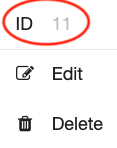
Table Name: Invoice Line Item
|
Index Value |
Quantity (Field ID: 11) |
Item Number (Field ID: 7) |
Description (Field ID: 10) |
Extended Amount (Field ID: 2) |
Total Amount (Field ID: 3) |
|---|---|---|---|---|---|
|
0 |
5 |
46465 |
Red Guitar |
199.99 |
999.95 |
|
1 |
2 |
25632 |
100 ft Wire |
49.99 |
99.98 |
|
2 |
3 |
74458 |
50 ft Premium Wire |
59.99 |
179.97 |
|
3 |
1 |
42589 |
Les Paul |
1099.99 |
1099.99 |
|
4 |
4 |
63895 |
100 ct Picks |
9.99 |
39.96 |
|
5 |
2 |
85236 |
Amp |
249.99 |
499.98 |
Here is the more complex example to show what S9 Notations are capable of. This example attempts to extract the confidence of a particular value in the Table Field. To focus on this value, it attempts a mathematical operation within the second index of the Table Field. This operation is checking the length of the Table Field column and then subtracting a counter from it to specify the index. This index is then used to extract the confidence from that specific table cell.

Notation Math
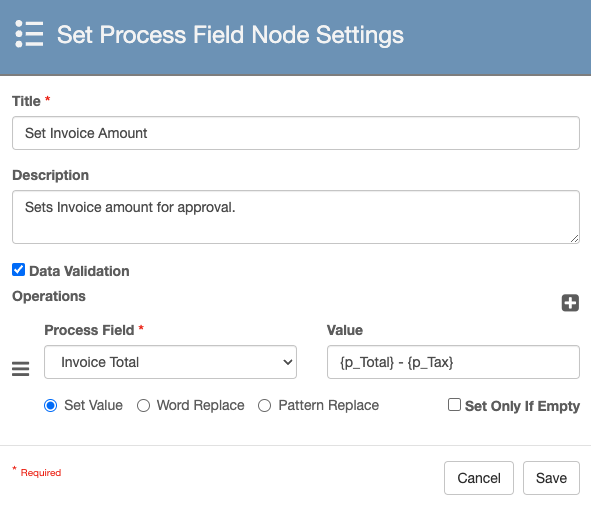
You can use addition and subtraction in S9 Notation-based operations. The values that are needed to do math do not need to be S9 Notations, but at least one of the values included in the string does.
|
Operation |
Symbol |
Example |
Escaped version (will not do math |
|---|---|---|---|
|
Addition |
|
|
|
|
Subtraction |
|
|
|
|
Division |
|
|
|
|
Multiplication |
|
|
|
|
Exponent |
|
|
|
|
Parenthesis |
|
|
|
Numeric and Decimal Data Types
Add and Subtract numeric and decimal values to obtain the net cost of an item or increment a counter.
-
{p_Total} + {p_Tax} - Sums the Total and Tax field values.
-
{p_Total} - {p_Unreimbursed Expenses} + {p_Mileage Cost} - Subtracts the Unreimbursed Expenses value from the Total value and then adds the Mileage Cost value.
-
{p_Count} + 1 - Increments the Count value by 1.
Date Data Type
Add and Subtract a specified number of days from a date. This is useful for retention of documents or ensuring due dates are not missed.
-
{Today} + 30 - Adds 30 days to the current system date.
-
{Today} - 15 - Subtracts 15 days from the current system date.
-
{p_Document Date} + 5 - Adds 5 days to the date value stored in the field Document Date.
Escaping Math
You must be on GlobalCapture 3.1.135 to escape math.
Mathematical operations can be performed on numeric, date, or decimal field. If you have two of these types of fields and you want to present the data as a range, you can block the math from executing by adding a backslash (\) in front of the mathematical operator. This can be useful when setting a range of values or dates in a field.
When doing this, the data must be added to a Character field otherwise the workflow will error.
Example: I wish to set the value of a field to a range of values based on values set in other fields.
|
Process Field Name |
Type |
Value |
|---|---|---|
|
Start |
Numeric |
1 |
|
End |
Numeric |
8 |
|
Range |
Character |
|
Now you can escape the math with \. So an expression like:
{p_Start} \- {p_End}
will not perform the math, and result in the desired output of "1 - 8".
If setting a range of Dates using Date fields ensure your date fields are using just the date and not the date and time or they have enough Length to accomodate the date and time range values.
The default Length of 50 will not be long enough to accommodate a date range with time.